A football life-sim · iOS
Soccer CareerGlobe Cup
A football career, from academy hopeful to global legend. Five continents, one cup, and one story that's entirely yours to write.
Out now · built for iPhone
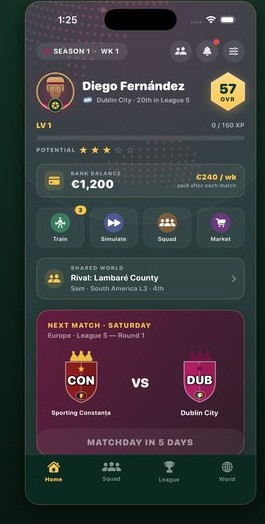
A football career, from academy hopeful to global legend. Five continents, one cup, and one story that's entirely yours to write.
Live a career one week at a time — train, transfer, and climb. Simple to pick up, deep enough to lose a season to.
Rise through UEFA, CONMEBOL, CAF, AFC and CONCACAF. The world spins on, week after week, and every result ripples through it.
Start as a 57-rated academy kid and grow into a legend. Train, play the big matchdays, chase transfers and bank balance — every call is yours.
Invite a friend with a short world code. You each play your own career inside one shared world that moves forward together — synced over iCloud.
No login, no password, no ads, no tracking, and no servers to trust. The whole career mode works fully offline — just football.
From your matchday hub to the living world map and a player profile with real depth.
Your matchday hub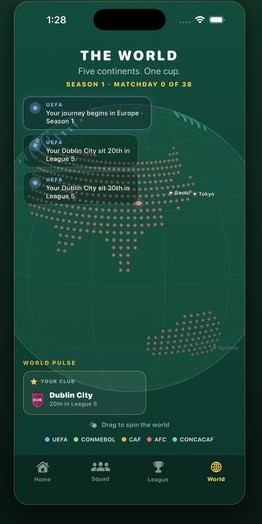 The living world
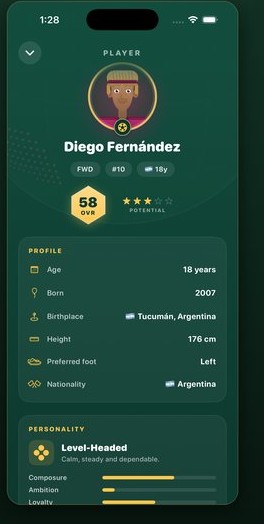 Players with depth
Spotted a bug, stuck on something, or have an idea to make the game better? I read every message and I'm always happy to help.
✉ vetanfcsolutions@gmail.comI usually reply within a couple of days. Telling me your device and iOS version helps me sort things faster.
In multiplayer you share one living world. One player hosts a world and gets a short world code; the other enters that code to join. You each play your own career in the same world — play your week, they play theirs, and the world moves forward together. Multiplayer uses Apple's iCloud (CloudKit), so both players just need to be signed in to iCloud on their device.
No. There's no account to create and no password. The whole career mode is playable offline. Online multiplayer simply uses your device's own iCloud — nothing else to sign into.
Your single-player career is saved locally on your device. Shared multiplayer worlds live in your iCloud. As long as you're signed in to the same Apple Account, your progress stays with you.
Notifications (used to tell you when your friend has taken their turn) are optional. You can change them any time in iOS Settings → Notifications → Globe Cup. The game works fine with them off.
Starting a new career overwrites your local save. To remove shared multiplayer data, leave or delete the shared world from within the app. To wipe everything, delete the app — and to clear its iCloud data, use iOS Settings → your name → iCloud → Manage Account Storage → Globe Cup. Questions? Just email me.
No. There are no analytics, no ads, and no third-party tracking of any kind, and I run no servers. See the Privacy Policy for the full details.